| ▲ | manlymuppet 2 days ago |
| Power user experience is not the same thing as user experience in general. If you want to make the argument that all developer tooling should be keyboard-driven, fine, be my guest. But most people aren't willing to deal with the learning curve of keyboard-driven GUIs, and that's okay. We shouldn't force it. HN's insistence on acting like all users are Arch Linux efficiency perfectionist hacker types is painfully corny. (This reads harsher than I intended. Sorry about that. I love Arch Linux people. It's just think it's no less noble to serve the average Joe than to create the perfect tool for power users.) |
|
| ▲ | preg_match a day ago | parent | next [-] |
| Where this falls apart is commercial software. The issue is we use off-the-shelf frameworks and tools for commercial software. And then we don't train developers on how to write high-volume software. Commercial software is THE power user use case. Your users will be using your software 8 hours a day, 5 days a week, for years. And still, the software is obtuse point-and-click garbage. Meanwhile commercial software from 25 years ago could be navigated at light speed. That's part of the reason Excel can't be dethroned. Excel is from the old age of software, and that means that users can input and navigate at light speed. All these fancy tools claim to dethrone Excel, but when you actually use them you realize it's a goo goo ga ga Fisher Price level UI. Extreme amounts of whitespace, buttons hidden behind submenus of submenus (which you have to navigate by eye, by the way!), features stripped, UI constantly shuffling around between updates. Look, that works fine for a website on the open web where you assume your users have never touched a computer before. That does not work for commercial software. |
| |
| ▲ | red_admiral a day ago | parent | next [-] | | > UI constantly shuffling around between updates. and then 365 came along ... an option to pull stock market data here, a LinkedIn connection there, oh look a wild copilot button appeared. | |
| ▲ | IdiotSavage a day ago | parent | prev | next [-] | | > …and that means that users can input and navigate at light speed. Oh yeah? I remember when they introduced these shitty animations that made everything feel extremely laggy. From the article linked below: "Microsoft Excel now animates certain actions as you work. For instance, when you move from one cell to another, it animates the move. When you paste copied information, it animates the paste. Or when you enter a formula, it animates the calculation." https://www.adventuresincre.com/disable-animations-excel/ | |
| ▲ | NooneAtAll3 a day ago | parent | prev [-] | | I think you vaaastly overestimate how excel is used by most users if anything, excel exceeds in being MOUSE-driven - it's intuitive in what you press and what you drag and that's kinda my problem with the TFA - author is not representative of typical user. Mouse interaction is the king | | |
| ▲ | kbelder a day ago | parent | next [-] | | Screwing with a keyboard combo in Excel... like Shift-Space to highlight a row... is like an IDE deciding to swap the key-bindings for '{' and '['. You'd have entire accounting and marketing departments in rebellion. Devs consistently underestimate how many power users of Excel there are, and often don't understand how they operate. | |
| ▲ | kalleboo a day ago | parent | prev | next [-] | | I got my wife a new MacBook Air, and figured there's no point in paying for MS Office, iWork is fine for the household stuff she needs it for. She loved Pages, being able to put images anywhere without stuff moving around behind her back. She hated Numbers, since there were no cut/copy/paste/undo buttons on the toolbar. This is someone who has been using Excel at work for decades at this point. Definitely had a sudden insight as to how differently many users work. | |
| ▲ | layer8 a day ago | parent | prev | next [-] | | Maybe by most users, but not by most users who use it for many hours daily for professional tasks (i.e. not just as a kind of tabular list editor). | |
| ▲ | preg_match a day ago | parent | prev | next [-] | | Basically everyone in a white collar job who is NOT a developer is using Excel. I'm a developer, even I have to use Excel at work. | | |
| ▲ | NooneAtAll3 a day ago | parent [-] | | that's exactly what I'm saying basically everyone uses Excel. And basically everyone is a MOUSE-first user (or, even further along the chain: TOUCHSCREEN-first) keyboard-based menu navigation is not intuitive. it can be "poweruser" oriented, but it's not for most of the userbase | | |
| ▲ | rhdunn a day ago | parent | next [-] | | Keyboard shortcuts for those menu items are what most people will learn -- save, print, cut, copy, and paste will be the common ones that a lot of people will know. I'd be willing to bet that professional typists and people who spend the majority of their day typing (email, word, IDEs/text editors, etc.) are the ones who will know more keyboard shortcuts and navigation, especially for the things they do repeatedly. | |
| ▲ | preg_match 15 hours ago | parent | prev [-] | | It really depends on how much you use it. If it's hours a day, you are a power user, and you'll learn the shortcuts. Otherwise it's annoying. |
|
| |
| ▲ | marshray a day ago | parent | prev [-] | | "Most users" are not who choose business software. |
|
|
|
| ▲ | OroPla 2 days ago | parent | prev | next [-] |
| The argument is that both should be supported, which seems like a valid wish. There's really no reason to either-or this. Just have both work. |
| |
| ▲ | magicalhippo 2 days ago | parent | next [-] | | Which, if you made say a regular Win32 application, was guaranteed. These newfangled frameworks dropped the ball, if anything. | | |
| ▲ | kerblang a day ago | parent [-] | | Not guaranteed but easy, because Windows has mnemonics, where you can associate arbitrarily nested menus with actions, and each menu can have its own mnemonic key, so that you press ALT, then, say, "k", then, maybe "m" and so on, following along with the menus as they drop down. This way it becomes easy to memorize key sequences; start by navigating with arrow keys, then eventually speed up as you memorize each menu item's mnemonic key, and if you ever forget, just look at the menu. It was the keyboard-friendliest idea ever, without requiring any sort of terminal. I'd even say friendlier than MacOS (heresy!!) or, yes, VIM (burn the witch!!!) | | |
| ▲ | magicalhippo a day ago | parent | next [-] | | Even if you didn't have mnemonics, you could use tab, arrow keys and alt if needed, to navigate, and space to "click" buttons and such. So even if the developer forgot to configure mnemonics, which was as easy as prefixing a letter with ampersand, you could navigate by keyboard. Sometimes tedious but beats not being able. | |
| ▲ | the_lucifer a day ago | parent | prev [-] | | > Not guaranteed but easy, because Windows has mnemonics, where you can associate arbitrarily nested menus with actions, and each menu can have its own mnemonic key, so that you press ALT, then, say, "k", then, maybe "m" and so on, following along with the menus as they drop down. > I'd even say friendlier than MacOS (heresy!!) Honestly, I disagree. If you've used macOS for a length of time, you might be aware of the universal menu search system using (cmd+? i.e. cmd+shift+/). Hit that, type the menu item name, and simply hit return to activate it. Doesn't get simpler than that. The alt+ system always feels very janky to me on Windows because on many apps, hitting Alt relayouts the entire app sometimes to show the menu bar on top. | | |
| ▲ | lucumo a day ago | parent | next [-] | | > cmd+? i.e. cmd+shift+/ (...) Doesn't get simpler than that. That's a very two-handed ableist view. Imagine having lost your arm and being told hitting three keys on opposite ends of the keyboard is simple. I'm joking, but only about the calling you ableist and the emotional response parts. The situation does really occur. Keyboards aren't always the most accessible option. (Hotkeys reveal mental limitations in myself. I can rarely remember them. I know a ton, but I've forgotten so many more. On MacOS in particular, when multiple modifiers are involved. Can never remember if it's cmd-shift, cmd-option, option-shift, cmd-ctrl, cmd-fn, or whatever.) | |
| ▲ | zelphirkalt a day ago | parent | prev [-] | | Usually though, the menu bar only appears on key release, not on holding it down, as part of pressing the ALT+something shortcut. |
|
|
| |
| ▲ | manlymuppet 2 days ago | parent | prev [-] | | Well the two--building for power users vs for a general audience--often work against each other. And trying to satisfy every audience at once is a good way to satisfy none. You don't want your app to be a Jack of all trades; focus is really valuable. | | |
| ▲ | oneeyedpigeon 2 days ago | parent | next [-] | | Do you have an example of how supporting a keyboard shortcut for every action could be bad for a general audience? | | |
| ▲ | Telaneo 2 days ago | parent [-] | | Devil's advocate: showing the relevant keyboard shortcuts in the UI can be overwhelming (or at least one of many parts that all together become overwhelming) to new users, while not having them shown at all makes them undiscoverable. I think this is a bad reason. Even MS Office has made this work. But I've seen people act on this type of argument. If nothing else, it should be possible to have a settings menu where you can define your own. Even if no shortcuts are set by default and they aren't shown anywhere else in the UI, it will still be possible for a power user to make the best use of the program. | | |
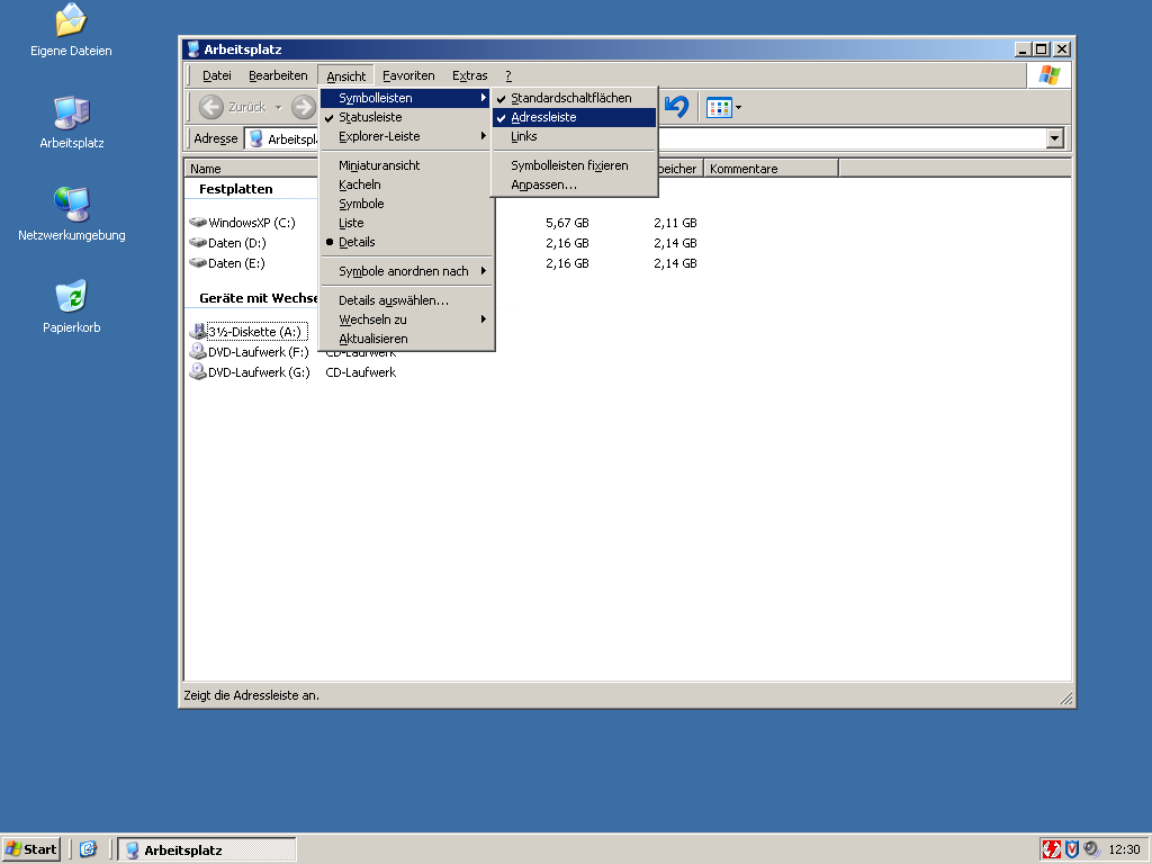
| ▲ | toast0 2 days ago | parent | next [-] | | > showing the relevant keyboard shortcuts in the UI can be overwhelming Underlining the accelerator key is subtle and shouldn't be overwelming. Keyboard navigation unaware users probably won't even notice. | | |
| ▲ | Telaneo 2 days ago | parent [-] | | This works poorly if you intend to localise your application. Great if you don't though. | | |
| ▲ | jakzurr a day ago | parent | next [-] | | (Speaking of menu/drop-downs with underlined characters for alt commands.) > This works poorly if you intend to localise your application. Great if you don't though. Sure that's true. But remember M$ allowed you to fairly easily edit those underlined-characters in, oh, for example Office 2002 and 2003. Even if you didn't have a lot of default underlines in your current language settings, it is still possible for someone to add their own underline-shortcuts. Back in those days, the first thing I did on any personal new install of Outlook, was to disable the shortcut that marked all email as being read. (That's cause I hit that button by accident too many times.) | | |
| ▲ | Telaneo a day ago | parent [-] | | > Sure that's true. But remember M$ allowed you to fairly easily edit those underlined-characters in, oh, for example Office 2002 and 2003. Even if you didn't have a lot of default underlines in your current language settings, it is still possible for someone to add their own underline-shortcuts. That's a feature that was hidden from me at least, but honestly, this is a good-ish solution to that problem. I remember Office having the underlines, but they were inconsistent between the original English and my localised version (and I used both depending on the machine), which made them useless. That wasn't that big of an issue when all the normal keyboard shortcuts are also written out, but it would have been even less of a problem if I knew how to edit them. |
| |
| ▲ | mghackerlady 4 hours ago | parent | prev | next [-] | | Even then, English has become the defacto language of computing. Some amount of knowledge of its basic vocab is expected, and many computer related words in other languages are english loanwords. | |
| ▲ | mixmastamyk a day ago | parent | prev | next [-] | | Windows did both successfully. | | |
| ▲ | Telaneo a day ago | parent [-] | | I can't remember an example that didn't also include the shortcut written in full, but I might just be drawing a blank here. Care to give an example? | | |
| ▲ | mixmastamyk a day ago | parent [-] | | Wasn't easy to find! https://www.augenbit.de/wiki/images/5/57/Arbeitsplatz.png | | |
| ▲ | Telaneo a day ago | parent | next [-] | | Fair. I just remember them being inconsistent between the English and localised versions of Windows, and given I used both, that turned into a nothing-feature. Another comment mentioned you could edit the underlines in Office 2003, but I never knew that back in the day (or until today for that matter...). | | |
| ▲ | toast0 a day ago | parent [-] | | It's pretty hard for the shortcuts to be consistent and localized. Especially if you also use different keyboard layouts when you're using different languages... Even for keys that aren't mnemonic, do you want undo to be ctrl + z or ctrl + the key closest to left shift? | | |
| ▲ | Telaneo a day ago | parent | next [-] | | > It's pretty hard for the shortcuts to be consistent and localized. Especially if you also use different keyboard layouts when you're using different languages... Hence my original comment. I haven't had a problem with different keyboard layouts, since most of the keys that change are on the outer edge, nowhere near where the most common shortcuts are located (then again, I rarely type using QWERTZ). > Even for keys that aren't mnemonic, do you want undo to be ctrl + z or ctrl + the key closest to left shift? CTRL+Z, since that's what it's been since time immemorial, even on ISO keyboards. Consistency is king. | |
| ▲ | ranger_danger 17 hours ago | parent | prev [-] | | And for complex languages like CJK, often the key you would press is not even present in the string at all. Example: What should the accelerator be, and how should it be displayed, if your "Exit" option is labeled 終了? I checked VLC and apparently they use: 終了 (Q) Even though "Q" doesn't necessarily make any sense to Japanese people who don't understand any English. | | |
| ▲ | Telaneo 16 hours ago | parent [-] | | Japanese keyboards also have Latin labels, so it's at least possible to put two and two together there, although it would probably be better to write '終了 (た)' (unless there are local conventions to the contrary). | | |
| ▲ | ranger_danger 15 hours ago | parent [-] | | Effectively nobody in Japan uses or even knows the kana keyboard layout though, only QWERTY. My comment was more that they may not know the word "quit" for the Q to be meaningful to them... not that they can't find it on the keyboard. Similarly as an English speaker I would be quite confused if the shortcut key for exit was a totally different letter like P or something. |
|
|
|
| |
| ▲ | jakzurr a day ago | parent | prev [-] | | Yup, pretty sure I've seen the same sorts of things using Asian characters. |
|
|
| |
| ▲ | wtallis a day ago | parent | prev [-] | | It sounds like your complaint might be that it works poorly if you half-ass the localization process and assume that literal translation of strings is most or all of what localization means. | | |
| ▲ | Telaneo a day ago | parent [-] | | I'm not sure how you read that from my comment. To be fair to your point though, that's what most localisation of programs are these days. |
|
|
| |
| ▲ | marcosdumay 2 days ago | parent | prev | next [-] | | > showing the relevant keyboard shortcuts in the UI can be overwhelming Every application did it for decades after the first Xerox guidelines up until Microsoft and Apple decided to retire the concept of usability some time around 2010. | | |
| ▲ | wolvoleo a day ago | parent | next [-] | | At least Apple still shows them when you hold option. At least they did when I still used a Mac. | |
| ▲ | Telaneo 2 days ago | parent | prev [-] | | something something smartphones |
| |
| ▲ | prmoustache a day ago | parent | prev [-] | | > Devil's advocate: showing the relevant keyboard shortcuts in the UI can be overwhelming That is not a requirement, having access to menus, a master help shortcut ir fuzzy search actions shorcut are other options. |
|
| |
| ▲ | mixmastamyk a day ago | parent | prev [-] | | Another person here is arguing for accessibility, which may have been overlooked. |
|
|
|
| ▲ | rhdunn a day ago | parent | prev | next [-] |
| In some cases you may need the keyboard accessibility. - Your mouse/trackpad breaks or isn't recognized? - The right mouse button for your trackpad isn't working for some reason (e.g. you spilled a drink on it). It should still be possible to use the context menu keyboard button to bring up the context menu. - Your hands are on the keyboard (typing a document, email, code, etc.) and it slows you down to move to the mouse/trackpad to perform an operation such as copying/pasting text or bringing up the spell checker context menu actions so you want to do those with the keyboard to keep yourself in the flow. Most often you'll learn keyboard shortcuts/interactions for your workflow then expand out as and when you need them. Sure, knowing all shortcuts and interactions is fairly limited, but the majority of people will know how to cut/copy/paste with the keyboard as those are common operations. |
|
| ▲ | reamaer 20 hours ago | parent | prev | next [-] |
| Whoa there. Allowing people to use keyboard is NOT the same as forcing people to use keyboard. Also, very few users will use only the keyboard, but quite many will use some part of keyboard access. If today I need to switch between proofreading languages a lot, you bet I will learn the keyboard shortcut for it (and forget day after that, until next time I needit again) |
|
| ▲ | laserbeam a day ago | parent | prev | next [-] |
| > But most people aren’t willing to deal with the learning curve of keyboard-driven GUIs. Keyboard shortcuts should be an _optional_ way to interact for accessibility and power users! They should never be required! This is what TUIs get wrong, they make it the required way to navigate and often don’t even let you use the mouse. |
|
| ▲ | neutronicus a day ago | parent | prev | next [-] |
| FWIW, I think it's a blind spot to think of power users as "Arch Linux people" using "developer tooling". My wife is a UX Design consultant and she had an engagement where a bunch of state government accountants were bemoaning how a redesigned procurement platform took away all their keyboard shortcuts. |
|
| ▲ | iLemming a day ago | parent | prev | next [-] |
| It really is not so much about keyboard vs. mouse - power users vs. average Joes. That all is just a discombobulation that distracts from the main issue and the issue is the accessibility of plain text. Majority of computer professionals (programmers included) come to appreciate a single fundamental truth about their field way too late into their careers. That the most basic foundational unit, the substrate they need to conquer is text. Everything stems from it. We have to deal with text our entire lives. It doesn't matter where that text appears - in web browsers, in Jira, in Slack, in terminal, in PDFs, Word or LaTeX documents. Code by the way is just structured text. The feeling of empowerment and liberation when you can deal with text on your own terms is a disproportionate multiplier. That's why using multiple cursors feature for the first time feels so amazing, even though the practical cases for it are not that common. And when I say "text", I don't only describe the process of "grabbing some text" and "piping it" into another process, or manipulating it. It's not only about the input, the act of consuming text is equally, if not more important. We argue that keyboard-driven UIs are more efficient for the input, but hundreds of memorized shortcuts can't really fix the fundamental problem. Vendors are designed to own you and ownership can take different forms. Slack app that doesn't let you easily extract code snippets from a thread - owns you. Jira that forces you to use their stupid, quirky wysiwyg editor - owns you. Note-taking app that keeps the data on the cloud ain't your friend. The friction is the ownership. When extraction of text requires effort, the tool has leverage over you. It's a subtler form than data lock-in, it is behavioral lock-in. You adapt your workflow to what the tool makes easy, and gradually the tool's affordances shape what you even think to do. Information gets buried in threads, search is mediocre, export is hostile. The "solution" they offer is to stay there longer - search in Slack, link to Slack, screenshare in Slack, summarize with AI in Slack, don't ever leave Slack. The tool becomes the answer to the problems the tool creates. And when you get to that point, you'd feel helpless - all your knowledge and muscle memory can't help you there - not only the app is not favoring power-user experience, it's forcing everyone downgrade to the "average Joe" levels. Most popular editors and IDEs don't give you direct leverage over plain text either, at least not without the effort from your side. Shortcuts, popups, UI elements in the IDE at best are local drivers - you can't easily grab a thing from the outside and feed it to your LLM context in the middle of a task, or insert within a comment in the code - you have to switch, copy, paste, deal with format inconsistencies, manual conversion, etc. Then we keep bargaining what method is the best, fastest and most convenient - using the mouse or keeping the fingers on the home row, modality or complex shortcuts. All for the sake of the problem that's artificially enforced on our workflows. Terminal-heavy users eventually start appreciating the leverage Unix philosophy grants them over text, but that's still contained within locality, they still have to constantly jump around, while eventually figuring out ways for automating some aspects of it. Point is - do not give in to the status quo. Liberate your text - deal with it on your terms. Get annoyed whenever you need to switch back and forth just for the sake of finding the piece you need and moving it around - it should be instantaneous and instinctual. Like a boxer moving in a ring and casually throwing heavy punches. Long-time Vim and Emacs users "get it", even though they often don't follow through - some things just never become gratifying instincts. Sometimes, even the opposite forms - like redundant muscle memories. Some outright would reject using a new app because it messes with one shortcut they keep accidentally pressing. Sometimes, I wish there was an agreed standard for every UI - to have only the core, commonly used keys pre-set, while making everything else configurable. |
|
| ▲ | joe_the_user 12 hours ago | parent | prev | next [-] |
| I don't know where you got "forcing" here. The author is arguing for guis that give the option of keyboard use. Unless you think having hot keys underlined nonconsensually imposes visual complexity and confusion on the hapless non-power-user, I don't see where your argument makes sense here. |
|
| ▲ | Eji1700 a day ago | parent | prev | next [-] |
| Eh I think things like vimium have kinda solved this. Push a button, every icon is now labeled with a key, type that key, counts as a click, done. I get that this does NOT solve for say, someone who's blind (i guess you could announce them, not sure), but it is easy enough I've found even lower tech people are fine with it. As always, a lot of the trick is communicating the interface and using modern standards, not "Well it's ctrl + insert because that's what it is on linux" |
| |
| ▲ | chrisjj 14 hours ago | parent [-] | | > Push a button, every icon is now labeled with a key, type that key, counts as a click, done. So, omits the text-labelled buttons? | | |
| ▲ | Eji1700 12 hours ago | parent [-] | | No? I’d say just test or YouTube how it works. Its a bad explanation |
|
|
|
| ▲ | fny 2 days ago | parent | prev | next [-] |
| Power user experience is not the same across disciplines either. God forbid I should ever be forced to use Blender or Inkscape with only buttons. |
| |
| ▲ | prmoustache a day ago | parent [-] | | Why do you introduce the concept of being forced to in the conversation? | | |
| ▲ | oasisaimlessly a day ago | parent [-] | | Because most people do not get to choose what software they use for working? | | |
| ▲ | prmoustache a day ago | parent [-] | | Can we stay on topic? We are in the subject of making UIs keyboard drivable. |
|
|
|
|
| ▲ | eldaisfish 2 days ago | parent | prev | next [-] |
| you are arguing against a strawman. Most reasonable people want support for both keyboard and mouse-based navigation. For example, why did Edge and possible chrome, remove support for Back via the backspace key? Literally, why remove something that exists and that some people might use? Same with some web forms where hitting enter in a text box does nothing. I expect it to submit a form, but very often, it does nothing. |
| |
| ▲ | chuckadams 2 days ago | parent | next [-] | | > For example, why did Edge and possible chrome, remove support for Back via the backspace key? Because people were triggering it by accident all the time. Firefox and Safari don't navigate back on backspace either. Enter only auto-submits if there's a visible submit button or if there's just one input, and that behavior goes back as far as I can remember. | | |
| ▲ | kbelder a day ago | parent | next [-] | | Yeah, that wasn't an attempt to remove keyboard navigation, that was fixing a painful error in keyboard navigation. | |
| ▲ | Balooga a day ago | parent | prev | next [-] | | I'm surprised the person responsible for <backspace> mapping to Back navigation didn't mandate that <del> would be super awesome for Forward navigation. | | | |
| ▲ | wolvoleo a day ago | parent | prev | next [-] | | Yes it was an error because backspace does function as a backspace when a text input field has the focus. Making something that should be muscle memory context-dependent. It should have been Ctrl-Backspace or something. | |
| ▲ | eldaisfish a day ago | parent | prev [-] | | right now, i cannot even enable Backspace = go back on Edge. I am forced to use Edge on my work computer and i hate that this feature is gone. Not disabled, just gone. About enter to auto submit, i've been running into this problem more often where some web frameworks just ignore the Enter key. There is a submit button, but i cannot trigger it via the enter key. | | |
| ▲ | HappMacDonald a day ago | parent | next [-] | | Is alt-left to go back a bad keyboard shortcut for you? It's what I use. It's also far less likely to be accidentally typed while trying to fill in a form and fumbling the tab navigation. | |
| ▲ | orbital-decay a day ago | parent | prev [-] | | Every small feature is used by some subset of users, but if you don't trim your software from time to time then feature creep will eventually make it incoherent. Yes, it involves even small details like this one. I don't think learning another hotkey is a big problem, and anyone using keyboard navigation on the web should generally be at least aware of a ton of existing Vim-like navigation extensions (and even browsers) |
|
| |
| ▲ | toast0 2 days ago | parent | prev | next [-] | | > For example, why did Edge and possible chrome, remove support for Back via the backspace key? Because alt+left is a better choice? Really f**ing annoying when some dumb javascript removes focus from a text box you're editing and the page navigates back. | |
| ▲ | Telaneo a day ago | parent | prev | next [-] | | I specifically had to disable that via about:config in Firefox ages ago because I pressed it by accident all the time. Often while I was going through a 30 point form, only to then lose all my progress. To be fair, browsers probably should try to not undo progress like that, so you can just go forward again and get right back where I started, but I've never trusted them to actually do that. I've been burned too many times. I can kinda get that one. | |
| ▲ | ethin a day ago | parent | prev | next [-] | | Agreed. I'll say the same about accessibility. People really need to test for this more. If your app is not accessible I literally cannot use your app regardless of how useful it might be. This is pretty much why I currently don't use IDEs like Zed: even if I wanted to I can't because it presents no accessibility tree. | |
| ▲ | orbital-decay a day ago | parent | prev [-] | | > For example, why did Edge and possible chrome, remove support for Back via the backspace key? Literally, why remove something that exists and that some people might use? Because web pages don't preserve element focus well, web was originally meant for documents in the first place, not UIs. If you're trying to erase a character and the focus has been lost, you go back in history instead. It's a real existing problem in poorly designed pages, not a nefarious plot to annoy power users by Google, Microsoft, or Mozilla. It was always janky as hell. |
|
|
| ▲ | EA-3167 a day ago | parent | prev [-] |
| No honestly some harshness is warranted, most of the people alive have internet access and a smartphone, this is a more ubiquitous activity than many others we require or expect accommodations from. This site has a lot of good to offer, but sometimes the bubble needs a reality check that their needs and concerns are even more niche than disabilities like
Blindness. |