| ▲ | OroPla 2 days ago |
| The argument is that both should be supported, which seems like a valid wish. There's really no reason to either-or this. Just have both work. |
|
| ▲ | magicalhippo 2 days ago | parent | next [-] |
| Which, if you made say a regular Win32 application, was guaranteed. These newfangled frameworks dropped the ball, if anything. |
| |
| ▲ | kerblang a day ago | parent [-] | | Not guaranteed but easy, because Windows has mnemonics, where you can associate arbitrarily nested menus with actions, and each menu can have its own mnemonic key, so that you press ALT, then, say, "k", then, maybe "m" and so on, following along with the menus as they drop down. This way it becomes easy to memorize key sequences; start by navigating with arrow keys, then eventually speed up as you memorize each menu item's mnemonic key, and if you ever forget, just look at the menu. It was the keyboard-friendliest idea ever, without requiring any sort of terminal. I'd even say friendlier than MacOS (heresy!!) or, yes, VIM (burn the witch!!!) | | |
| ▲ | magicalhippo a day ago | parent | next [-] | | Even if you didn't have mnemonics, you could use tab, arrow keys and alt if needed, to navigate, and space to "click" buttons and such. So even if the developer forgot to configure mnemonics, which was as easy as prefixing a letter with ampersand, you could navigate by keyboard. Sometimes tedious but beats not being able. | |
| ▲ | the_lucifer a day ago | parent | prev [-] | | > Not guaranteed but easy, because Windows has mnemonics, where you can associate arbitrarily nested menus with actions, and each menu can have its own mnemonic key, so that you press ALT, then, say, "k", then, maybe "m" and so on, following along with the menus as they drop down. > I'd even say friendlier than MacOS (heresy!!) Honestly, I disagree. If you've used macOS for a length of time, you might be aware of the universal menu search system using (cmd+? i.e. cmd+shift+/). Hit that, type the menu item name, and simply hit return to activate it. Doesn't get simpler than that. The alt+ system always feels very janky to me on Windows because on many apps, hitting Alt relayouts the entire app sometimes to show the menu bar on top. | | |
| ▲ | lucumo a day ago | parent | next [-] | | > cmd+? i.e. cmd+shift+/ (...) Doesn't get simpler than that. That's a very two-handed ableist view. Imagine having lost your arm and being told hitting three keys on opposite ends of the keyboard is simple. I'm joking, but only about the calling you ableist and the emotional response parts. The situation does really occur. Keyboards aren't always the most accessible option. (Hotkeys reveal mental limitations in myself. I can rarely remember them. I know a ton, but I've forgotten so many more. On MacOS in particular, when multiple modifiers are involved. Can never remember if it's cmd-shift, cmd-option, option-shift, cmd-ctrl, cmd-fn, or whatever.) | |
| ▲ | zelphirkalt a day ago | parent | prev [-] | | Usually though, the menu bar only appears on key release, not on holding it down, as part of pressing the ALT+something shortcut. |
|
|
|
|
| ▲ | manlymuppet 2 days ago | parent | prev [-] |
| Well the two--building for power users vs for a general audience--often work against each other. And trying to satisfy every audience at once is a good way to satisfy none. You don't want your app to be a Jack of all trades; focus is really valuable. |
| |
| ▲ | oneeyedpigeon 2 days ago | parent | next [-] | | Do you have an example of how supporting a keyboard shortcut for every action could be bad for a general audience? | | |
| ▲ | Telaneo 2 days ago | parent [-] | | Devil's advocate: showing the relevant keyboard shortcuts in the UI can be overwhelming (or at least one of many parts that all together become overwhelming) to new users, while not having them shown at all makes them undiscoverable. I think this is a bad reason. Even MS Office has made this work. But I've seen people act on this type of argument. If nothing else, it should be possible to have a settings menu where you can define your own. Even if no shortcuts are set by default and they aren't shown anywhere else in the UI, it will still be possible for a power user to make the best use of the program. | | |
| ▲ | toast0 2 days ago | parent | next [-] | | > showing the relevant keyboard shortcuts in the UI can be overwhelming Underlining the accelerator key is subtle and shouldn't be overwelming. Keyboard navigation unaware users probably won't even notice. | | |
| ▲ | Telaneo 2 days ago | parent [-] | | This works poorly if you intend to localise your application. Great if you don't though. | | |
| ▲ | jakzurr a day ago | parent | next [-] | | (Speaking of menu/drop-downs with underlined characters for alt commands.) > This works poorly if you intend to localise your application. Great if you don't though. Sure that's true. But remember M$ allowed you to fairly easily edit those underlined-characters in, oh, for example Office 2002 and 2003. Even if you didn't have a lot of default underlines in your current language settings, it is still possible for someone to add their own underline-shortcuts. Back in those days, the first thing I did on any personal new install of Outlook, was to disable the shortcut that marked all email as being read. (That's cause I hit that button by accident too many times.) | | |
| ▲ | Telaneo a day ago | parent [-] | | > Sure that's true. But remember M$ allowed you to fairly easily edit those underlined-characters in, oh, for example Office 2002 and 2003. Even if you didn't have a lot of default underlines in your current language settings, it is still possible for someone to add their own underline-shortcuts. That's a feature that was hidden from me at least, but honestly, this is a good-ish solution to that problem. I remember Office having the underlines, but they were inconsistent between the original English and my localised version (and I used both depending on the machine), which made them useless. That wasn't that big of an issue when all the normal keyboard shortcuts are also written out, but it would have been even less of a problem if I knew how to edit them. |
| |
| ▲ | mghackerlady 4 hours ago | parent | prev | next [-] | | Even then, English has become the defacto language of computing. Some amount of knowledge of its basic vocab is expected, and many computer related words in other languages are english loanwords. | |
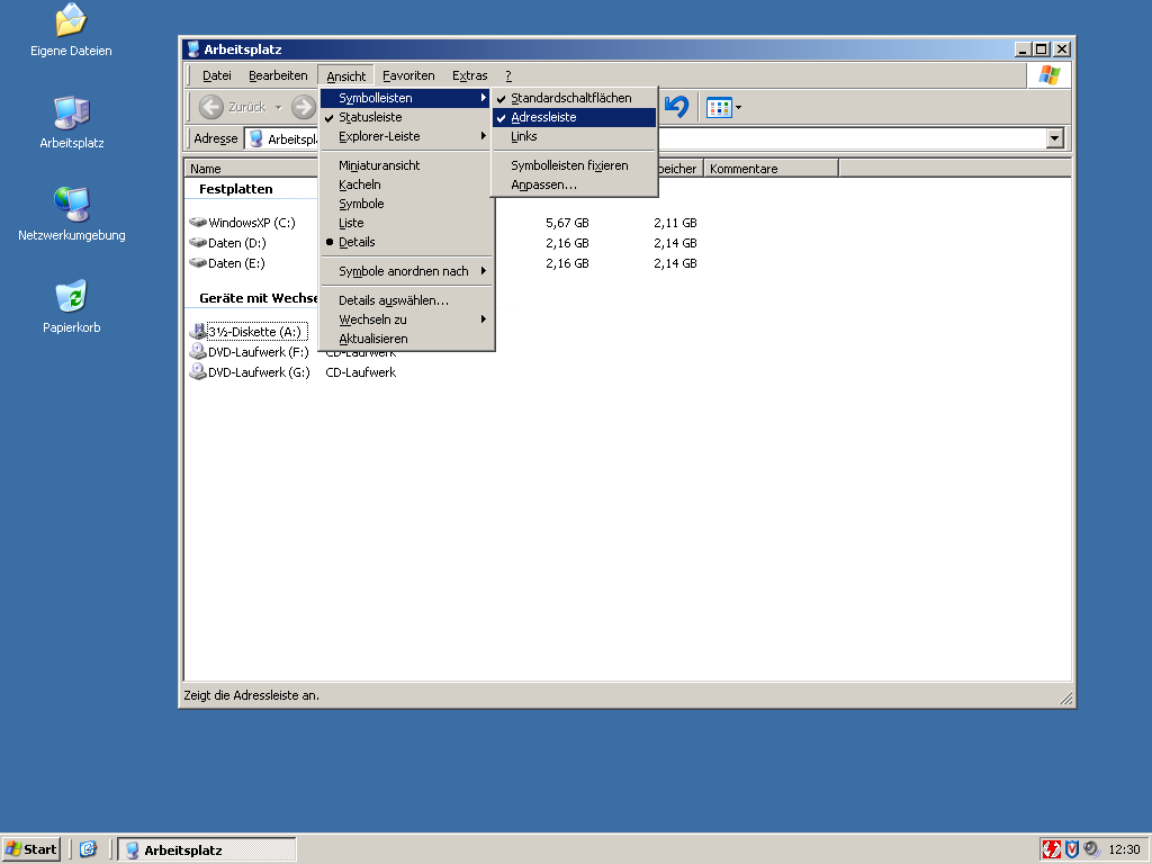
| ▲ | mixmastamyk a day ago | parent | prev | next [-] | | Windows did both successfully. | | |
| ▲ | Telaneo a day ago | parent [-] | | I can't remember an example that didn't also include the shortcut written in full, but I might just be drawing a blank here. Care to give an example? | | |
| ▲ | mixmastamyk a day ago | parent [-] | | Wasn't easy to find! https://www.augenbit.de/wiki/images/5/57/Arbeitsplatz.png | | |
| ▲ | Telaneo a day ago | parent | next [-] | | Fair. I just remember them being inconsistent between the English and localised versions of Windows, and given I used both, that turned into a nothing-feature. Another comment mentioned you could edit the underlines in Office 2003, but I never knew that back in the day (or until today for that matter...). | | |
| ▲ | toast0 a day ago | parent [-] | | It's pretty hard for the shortcuts to be consistent and localized. Especially if you also use different keyboard layouts when you're using different languages... Even for keys that aren't mnemonic, do you want undo to be ctrl + z or ctrl + the key closest to left shift? | | |
| ▲ | Telaneo a day ago | parent | next [-] | | > It's pretty hard for the shortcuts to be consistent and localized. Especially if you also use different keyboard layouts when you're using different languages... Hence my original comment. I haven't had a problem with different keyboard layouts, since most of the keys that change are on the outer edge, nowhere near where the most common shortcuts are located (then again, I rarely type using QWERTZ). > Even for keys that aren't mnemonic, do you want undo to be ctrl + z or ctrl + the key closest to left shift? CTRL+Z, since that's what it's been since time immemorial, even on ISO keyboards. Consistency is king. | |
| ▲ | ranger_danger 18 hours ago | parent | prev [-] | | And for complex languages like CJK, often the key you would press is not even present in the string at all. Example: What should the accelerator be, and how should it be displayed, if your "Exit" option is labeled 終了? I checked VLC and apparently they use: 終了 (Q) Even though "Q" doesn't necessarily make any sense to Japanese people who don't understand any English. | | |
| ▲ | Telaneo 16 hours ago | parent [-] | | Japanese keyboards also have Latin labels, so it's at least possible to put two and two together there, although it would probably be better to write '終了 (た)' (unless there are local conventions to the contrary). | | |
| ▲ | ranger_danger 16 hours ago | parent [-] | | Effectively nobody in Japan uses or even knows the kana keyboard layout though, only QWERTY. My comment was more that they may not know the word "quit" for the Q to be meaningful to them... not that they can't find it on the keyboard. Similarly as an English speaker I would be quite confused if the shortcut key for exit was a totally different letter like P or something. |
|
|
|
| |
| ▲ | jakzurr a day ago | parent | prev [-] | | Yup, pretty sure I've seen the same sorts of things using Asian characters. |
|
|
| |
| ▲ | wtallis a day ago | parent | prev [-] | | It sounds like your complaint might be that it works poorly if you half-ass the localization process and assume that literal translation of strings is most or all of what localization means. | | |
| ▲ | Telaneo a day ago | parent [-] | | I'm not sure how you read that from my comment. To be fair to your point though, that's what most localisation of programs are these days. |
|
|
| |
| ▲ | marcosdumay 2 days ago | parent | prev | next [-] | | > showing the relevant keyboard shortcuts in the UI can be overwhelming Every application did it for decades after the first Xerox guidelines up until Microsoft and Apple decided to retire the concept of usability some time around 2010. | | |
| ▲ | wolvoleo a day ago | parent | next [-] | | At least Apple still shows them when you hold option. At least they did when I still used a Mac. | |
| ▲ | Telaneo 2 days ago | parent | prev [-] | | something something smartphones |
| |
| ▲ | prmoustache 2 days ago | parent | prev [-] | | > Devil's advocate: showing the relevant keyboard shortcuts in the UI can be overwhelming That is not a requirement, having access to menus, a master help shortcut ir fuzzy search actions shorcut are other options. |
|
| |
| ▲ | mixmastamyk a day ago | parent | prev [-] | | Another person here is arguing for accessibility, which may have been overlooked. |
|