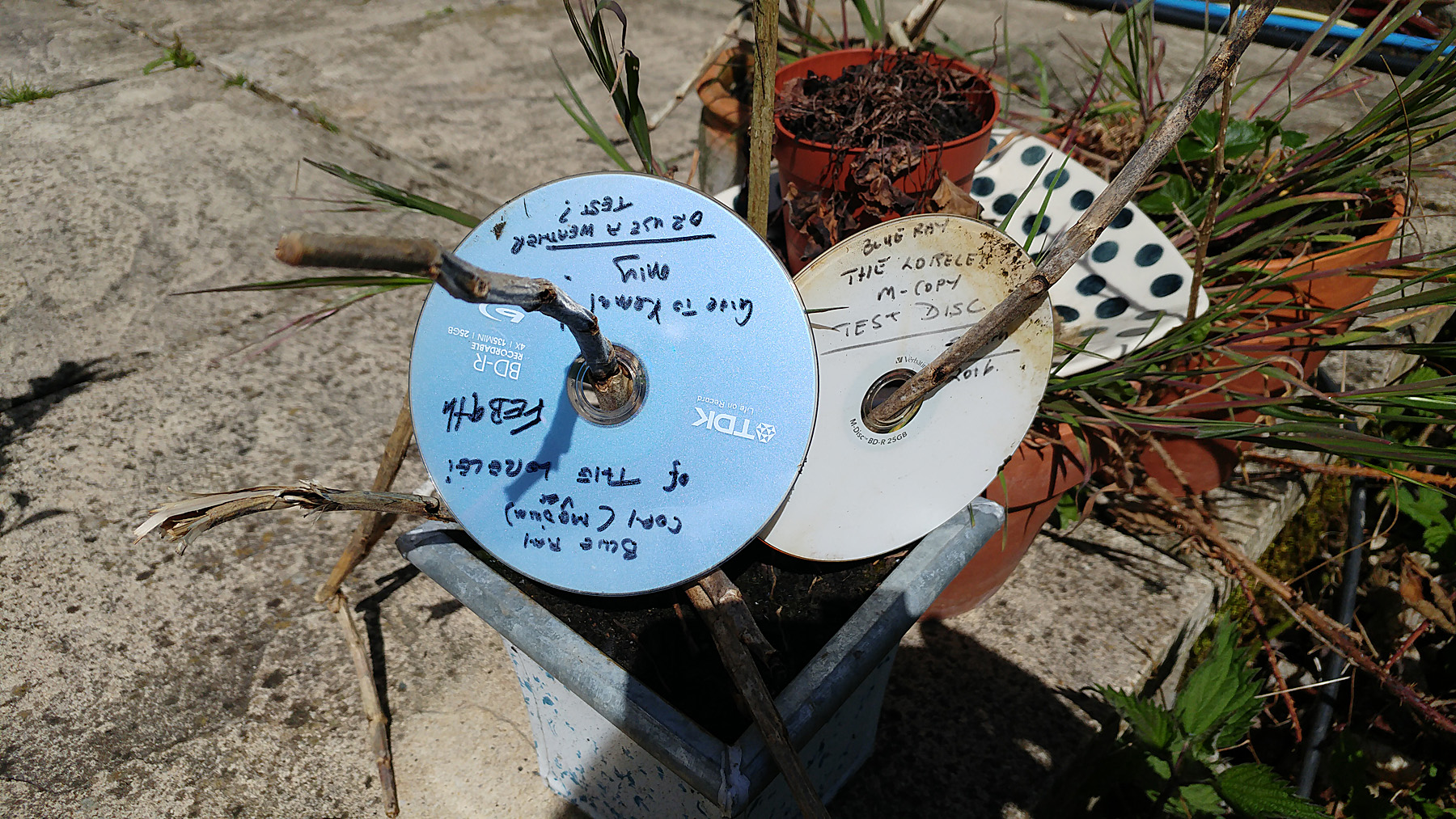
| ▲ | A review of M Disc archival capability with long term testing results (2016)(microscopy-uk.org.uk) |
| 44 points by 1970-01-01 6 hours ago | 49 comments |
| |
|
| ▲ | torstenvl 16 minutes ago | parent | next [-] |
| Tangential, but what's up lately with anti-responsive design like this? Modern mobile browsers can render traditional sites just fine. It was the killer feature of the original iPhone. So I really fail to understand why you'd make a mobile version of your site that completely breaks on mobile. |
|
| ▲ | KillenBoek 5 hours ago | parent | prev | next [-] |
| Still using m-disc for family photo albums and having them in the bug out bag in case something goes wrong. Inexpensive and light. Such a shame the disk format is dying. |
| |
| ▲ | thomassmith65 5 hours ago | parent | next [-] | | I agree, but it's worse than a shame: it's an indictment of the tech industry! We have the entire planet storing all sorts of important business and personal data digitally - and no longer a good, common way to ensure it lasts even a decade. | | |
| ▲ | UltraSane 2 hours ago | parent [-] | | LTO tape exists and should last 30 to 50 years in good storage conditions. | | |
| ▲ | 8fingerlouie 34 minutes ago | parent | next [-] | | Assuming you need to “get up and go”, like a refugee situation, what are the chances that you’ll find a drive that can read Blu-ray disks, versus the chances that you’ll find a LTO tape drive ? | | |
| ▲ | aidenn0 12 minutes ago | parent [-] | | Blu-ray drives are fast becoming hard to find, so I'd pack a USB bluray drive with your discs. New computers don't have them and haven't for a few years. I purchased a drive recently and to get a quality drive, I had to go for a NOS pioneer drive, or get another LG, and the LG drives are kid-of shit. |
| |
| ▲ | VikingCoder 2 hours ago | parent | prev [-] | | I have a normal PC... I'd love some kind of external tape drive that I can connect with USB-C, or USB-3... But everything is SAS? And no way to convert SAS to SATA? Recommendations? | | |
| ▲ | aidenn0 11 minutes ago | parent | next [-] | | No recommendations, but you can get a thunderbolt to SAS adapter; they aren't cheap though. | |
| ▲ | 8fingerlouie 41 minutes ago | parent | prev | next [-] | | No recommendations, just brings back memories of the “good old days” with QIC-80 tapes and ZIP drives, both of which came with “desktop” in mind. I still have a ZIP drive around with a parallel port connector. I haven’t owned a computer with a parallel port in 20+ years. I probably also have a QIC-80 tape drive around somewhere. https://en.wikipedia.org/wiki/Quarter-inch_cartridge https://en.wikipedia.org/wiki/Zip_drive | |
| ▲ | UltraSane 39 minutes ago | parent | prev [-] | | The cheapest option is to get a SAS pcie card and a new drive like https://www.ebay.com/itm/198052084090 or try a much cheaper used drive. LTO drives are expensive but they are very well designed and it is the most reliable portable storage format available. Full LTO tapes in a good fire rated safe really provide a fantastic sense of security. The cost of the drive is amortized over the total bytes you store. |
|
|
| |
| ▲ | throwaway94275 5 hours ago | parent | prev | next [-] | | For DVDs: Walmart still sells a USB reader/burner for $30. Also I'd bet something will be able to read recordable disks in the future even without drives. Maybe a super super high resolution (compared to now) picture can simply be used to get the data from it visually in 30-40 years. | | |
| ▲ | aidenn0 10 minutes ago | parent [-] | | I'm hoping a few years down the road we'll have a greaseweazel equivalent for optical drives. |
| |
| ▲ | dehrmann 3 hours ago | parent | prev [-] | | > Such a shame the disk format is dying. On one hand, yes, it's dying. On the other, a PS5 can play DVDs, so there's one class of popular, modern hardware where it's alive and well. |
|
|
| ▲ | zetanor 5 hours ago | parent | prev | next [-] |
| IIRC, "M-Disc" branded discs stopped being "M-Disc"-spec at some point, but since it's quite a niche product that peaked (over?) a decade ago, it's hard to find any definitive information about this in 2026. It's a shame because I liked the format. I'd be glad to see any form of confirmation or correction. |
| |
| ▲ | ndiddy 5 hours ago | parent [-] | | If you’re talking about this post, it’s just someone who was misinformed. https://www.reddit.com/r/DataHoarder/s/cmxnECtgAv > Verbatim clarified that these discs were advancements. The technical changes resulted in a different appearance and the ability for higher burning speeds, the changed media-ID was due to an adaptation with regard to other Verbatim products. Verbatim had already shipped the first modified media in early 2022. The data security of the new discs is not inferior to that of the old discs: Data should also last 1000 years, according to the manufacturer. |
|
|
| ▲ | Luc 5 hours ago | parent | prev | next [-] |
| Cool, but the method of verifying the data (playing back the movie) seems non-optimal. The movie could have had some data corruption that went unnoticed. |
| |
| ▲ | dlcarrier 3 hours ago | parent | next [-] | | Also, the storing it outside isn't a very good test of how long it will last inside. Also also, M-Disc is like Imax, a theater could have that label because it projects 70mm film into a dome or because it's a regular movie theater with a lower resolution than your phone screen that licenses the rights to the name. There are M-Disc DVDs that use a special archival technology that requires compatible drives, but the M-Disc Blu-Ray discs are made with regular Blu-Ray manufacturing technology. With both Imax and M-Disc, they require a minimum quality level to license the trademark, but exceeding that quality level is far from exclusive to that trademark. | | |
| ▲ | protimewaster 2 hours ago | parent [-] | | My understanding is that the thing that makes M-Disc DVDs special is that they don't use organic dyes in the recording. Blu-ray discs, with the exception of the weird LTH ones, by default don't use organic dyes. Consequently, the main magic of DVD M-Disc is just the default with BDR. |
| |
| ▲ | irdc 3 hours ago | parent | prev | next [-] | | Ideally the test should include the number of bit errors that were corrected using on-disc ECC. This could then also be used to estimate disc lifetime (preferably using multiple samples). | |
| ▲ | instagib 4 hours ago | parent | prev [-] | | I have a script that creates a hash based on all files in a directory - photos 2004. Then save the hash separately to a text file. I have 3 copies so I can check the archive version, active storage volume, and local version to see if any lost integrity in the transfer process. I’m curious how it would compare against my old CDs and DVDs that were previous backups. My work does something similar for tape drive data. | | |
| ▲ | pwg 2 hours ago | parent | next [-] | | If you are willing to sacrifice some storage space on the disk, then dvdisaster (https://en.wikipedia.org/wiki/Dvdisaster) can add extra ECC data to the disk that will allow recovery even if some percentage of the disk errors out upon read later. Granted, if one no longer has the mechanical drive, or if the disk errors out beyond the threshold where the extra ECC can correct the errors, the data's still lost. But it (dvdisaster) does provide some protection from the "bit-rot" case where the disk slowly degrades. | |
| ▲ | dehrmann 3 hours ago | parent | prev [-] | | DVDs use Reed–Solomon coding, so they effectively store a hash and recovery data for you. When a sector is irrecoverable, reading that sector fails. | | |
| ▲ | Gabrys1 3 hours ago | parent [-] | | For this purpose, I think it would be nice to access the raw data, to see any errors that would be otherwise masked. As someone in the comments suggested, one might compare number of corrected errors in 1, 2, 5 years and compare to the number of redundant bits stored to estimate the expected longevity of the medium | | |
|
|
|
|
| ▲ | svilen_dobrev 6 hours ago | parent | prev | next [-] |
| [2016] would be interesting how that M-disc looks - and reads - today 10 years later.. |
|
| ▲ | kasabali 4 hours ago | parent | prev | next [-] |
| Does anyone know the control disc used (http://www.microscopy-uk.org.uk/mag/imgsep16/m-disc-test3.jp...) was HTL or LTH? |
| |
| ▲ | dlcarrier 3 hours ago | parent [-] | | As tested, it doesn't matter because the disc didn't even have a UV safe resin. The lifespan of the data area is only meaningful if the rest of the disc is intact. Granted, archival discs aren't designed for full-sun exposure to start with, so in theory, the failed disc could have outlasted the other under real-world archival conditions, and this test wouldn't reveal that. |
|
|
| ▲ | AshamedCaptain 5 hours ago | parent | prev [-] |
| I still use optical discs for my personal backups and have done since 95. My biggest concern is whether I will still be able to buy new drives and blank media in 10, 20 years. Or physical media at all... Please do not say LTO tapes. The drives are huge, noisy, expensive, and they have a very quick deprecation policy (new drives cant use old tapes). |
| |
| ▲ | buildbot 5 hours ago | parent | next [-] | | You can still buy brand new LTO-4 and up from a brief search - I think due to the enterprise use cases it’ll hang around longer than any other format. Tape existed before the HDD; it’ll be there watching HDDS pass away into the ether too. Probably a few tape drives on the Starship Enterprise somewhere. More seriously; you can buy used lto-7/8 for very little these days, and the tapes are extremely cheap per gb. The drives are somewhat loud; it’s not a beside device for sure. I’m finding it a bit of a pain to manage a good backup strategy with them. | | |
| ▲ | AshamedCaptain 2 hours ago | parent | next [-] | | You put exactly why I said do not mention LTO - You suggest buying multidecade old drives that are no longer manufactured, have weird interfaces that your 2026 PC no longer has, are expensive, large, noisy - You then mention LTO7 which will not read your LTO4 tapes and is not just expensive but literally out of reach economically for single home Basically LTO is a terrible backup strategy unless you have a lot of money regularly that you will spend in order to upgrade your entire equipment every two/three generations (otherwise your newer equipment wont read your old tapes). Or you have so much data to backup that cost of drives is not really an issue. | | |
| ▲ | adrian_b an hour ago | parent | next [-] | | Using HDDs for backup is also a terrible long term strategy, because you must have a lot of money regularly, to buy new HDDs to replace your old HDDs and this much more often than you need to buy a tape drive to migrate your tapes. I have stored a lot of data on HDDs, and the only reason why I have not lost any of it yet is because I have always used duplicate HDDs. After 5 years or more, most HDDs had some corrupted sectors, but they were not in the same positions in the duplicate HDDs, allowing complete recovery of the data. The reality is that both tapes and HDDs suck. What is really needed for long-term storage is a write-once memory with a lifetime of 100 years or more, based on an open standard that would ensure the availability of readers in the future. If such a memory would use optical reading, it would have to use a great number of layers, filling a 3D volume, in order to achieve densities comparable with the magnetic media. While several research projects in this direction have been announced from time to time, until now none of them has resulted in a commercial product. | |
| ▲ | buildbot an hour ago | parent | prev [-] | | I bought a thunderbolt to FC adapter; works perfectly on Mac and Linux. I mention LTO 4 because you can today, buy multi decades old LTO-4. Brand new. So in multiple decades from now, I assume you’ll be able to find LTO-7 or 8; brand new. A drive might cost a little more to obtain, but given the plethora of used multi decades old lto currently out there, it seems reasonable to expect that in a recovery scenario you’ll be able to shell out for the right drive. But yes for most HDDs or the cloud are better. No need to get spicy about it. |
| |
| ▲ | GTP 3 hours ago | parent | prev [-] | | AFAIK the tapes are cheap, but tape libs aren't. Considering that they also take up a significant amount of space, I personally don't see them as a viable backup medium for most private users. | | |
| ▲ | protimewaster 2 hours ago | parent [-] | | You don't necessarily need a lib, though. Especially if you're interested in a use case where you can store data in a go bag, safe deposit box, etc., it seems like having individual tapes would be preferable. Individual used drives aren't too expensive (or at least didn't used to be). Libraries, in contrast, do tend to be more expensive (and also a lot more trouble to ship). |
|
| |
| ▲ | adrian_b 2 hours ago | parent | prev | next [-] | | New drives must read and write the previous generation of tapes and they must read the tape generation that was before the previous. | | |
| ▲ | AshamedCaptain 2 hours ago | parent [-] | | Which is disgrace when you consider that no optical drive is yet available that will not read original red book cd roms from the 80s. You say "it can read from one generation ago" as if it was some great thing about LTO when it is just a laughably fast obsolescence policy and what really kills it for a home user. A blueray drive manufactured today can still fscking write to a 90s CD-R from way before LTO even existed. | | |
| ▲ | adrian_b an hour ago | parent [-] | | That is easy for optical drives, because there is no direct relationship between the size of bits on the optical track and the dimensions of the read/write laser head. For magnetic media, the gaps in the magnetic circuit of the read/write heads are optimized for a certain dimension of the bits from the tape material and the efficiency of the read/write process greatly diminishes for other bit sizes. So there is no obsolescence policy, but there is a real technical difficulty in ensuring compatibility with older magnetic media with different bit densities. | | |
| ▲ | AshamedCaptain an hour ago | parent [-] | | That is not that simple. There is a relationship between laser and media, most optical drives to this day have entirely separate lasers for different generations of media. At the very least, red vs blue lasers. It is not as simple as claiming that optical drives have it easier technologically. If anything, I would claim that tapes have it simpler, definitely for reading at least. There is _nothing_ preventing LTO from retrocompatibility other than market forces. |
|
|
| |
| ▲ | dlcarrier 3 hours ago | parent | prev | next [-] | | The larger issue with tapes is that the small magnetic domains don't hold data as long as the mechanical changes in optical disks. | | |
| ▲ | adrian_b 2 hours ago | parent [-] | | The tapes are guaranteed for 30 years. Most optical discs do not have any guarantees about lifetime and the worst of them may survive only a few years. There have existed special quality optical discs with gold mirrors that were guaranteed for 100 years, but those are no longer produced and a single modern tape cartridge stores as much data as thousands of those discs. There are several mechanisms of degradation of optical discs. If the plastic does not seal well enough the metallic mirror, the metal can become oxidized and transparent, so it no longer reflects enough of the laser light. This is why certain archival discs used gold mirrors, which cannot oxidize. The plastic resin may also degrade in various ways and cause disc deformation. | | |
| ▲ | AshamedCaptain an hour ago | parent [-] | | Any guarantee made by manufacturer about data on tape longevity is irrelevant unless it is easy for user to create the storage conditions under which is warranted, and that is usually not cheap. not hard to find stories about data on LTO tapes being unreadable after 5 years. The same as stories of data on even the worst CD-Rs being still readable after 30 years ( i can personaly attest to that). | | |
| ▲ | adrian_b an hour ago | parent [-] | | Some CD-Rs will certainly be readable after 30 years, but there have been plenty of bad CD-Rs that have become unreadable after less than 10 years. I had several hundred CD-Rs. Most of them were OK, especially the gold archival CD-Rs from Kodak, so I have migrated the data from them mostly to save space and improve access speed, not for them being too old. Nevertheless there have been a few that have gone bad, but I had duplicates for all of them, so I did not lose the data. Had I not been cautious, I would have lost some of the data. The main problem of optical discs is their much too low capacity in comparison with magnetic media. A small suitcase with tape cartridges contains as much data as a big cabinet full of the most dense optical discs. |
|
|
| |
| ▲ | aidenn0 7 minutes ago | parent | prev | next [-] | | > Please do not say LTO tapes. Literally every single reply to this comment mentions LTO; never change HN. | |
| ▲ | kevin_thibedeau 5 hours ago | parent | prev | next [-] | | > The drives are huge You can get 5.25" bay drives. | | |
| ▲ | buildbot 5 hours ago | parent [-] | | I believe they are all 5.25in, some are just in a case. Even the library drives are just two 5.25 bays put together, a full height drive; vs. the much more common half height. |
| |
| ▲ | buckle8017 5 hours ago | parent | prev [-] | | > The drives are huge, noisy, expensive, and they have a very quick deprecation policy (new drives cant use old tapes). Sure but old drives are widely available at low prices. | | |
| ▲ | buildbot 5 hours ago | parent | next [-] | | This is true - I got a fiber channel LTO-8 FH drive off ebay brand new in the IBM packaging for less than 750$ Tapes are 60; so breaking even against 15$ per TB HDDs is pretty fast. | |
| ▲ | AshamedCaptain 2 hours ago | parent | prev [-] | | No, they are not. Specially when you have to find the one drive that will read your tapes , connect to your computer, and many other constraints that a user will have. | | |
| ▲ | adrian_b 2 hours ago | parent [-] | | The connection to a computer does not have any special challenges, except that the computer must be a desktop with a free PCIe slot. Unless you have a server motherboard with an on-board SAS controller, you need to buy a SAS HBA card, put it in your desktop and also buy a compatible SAS cable, in order to connect an LTO tape drive to the computer. New tape drives are extremely expensive, e.g. $4500 for the last generation of LTO-9 tapes (18 TB/cartridge), but if you store at least a few hundred TB of data you recover the cost of the drive from the cost difference between HDDs and tape cartridges. I have an older LTO-7 (6 TB/cartridge) tabletop drive, which has cost me $3000 about 7 or 8 years ago (new), and there are several years since I have recovered its cost. If you do not intend to store more than 100 TB, the cheapest solution is to buy external HDDs, but for long term storage you must plan to migrate the data periodically, as the lifetime of HDDs is hard to predict and unlikely to be much greater than 5 years. |
|
|
|