Remix.run Logo
▲ srcreigh 4 hours ago

Nice post. Unsatisfying conclusion - did you ever figure out why the original adapter was throttled when plugged into the monitor, and not when plugged into the computer?

▲cibyr 4 hours ago | parent | next [-]

The additional latency from going through the monitor made the bandwidth-delay product exceed the amount of data the adapter was able to send before receiving an ack. I thought that was fairly clear from the explanation, but now I notice that he didn't mention the latency without the monitor.

▲nh2 an hour ago | parent [-]

That doesn't seem to be described by the article at all.

The latency added in the monitor is described as around 8 us, completely negligible compared to any Internet connection's latency.

So the latency without the monitor should be completely irrelevant.

▲nh2 an hour ago | parent | prev | next [-]

The article answers this

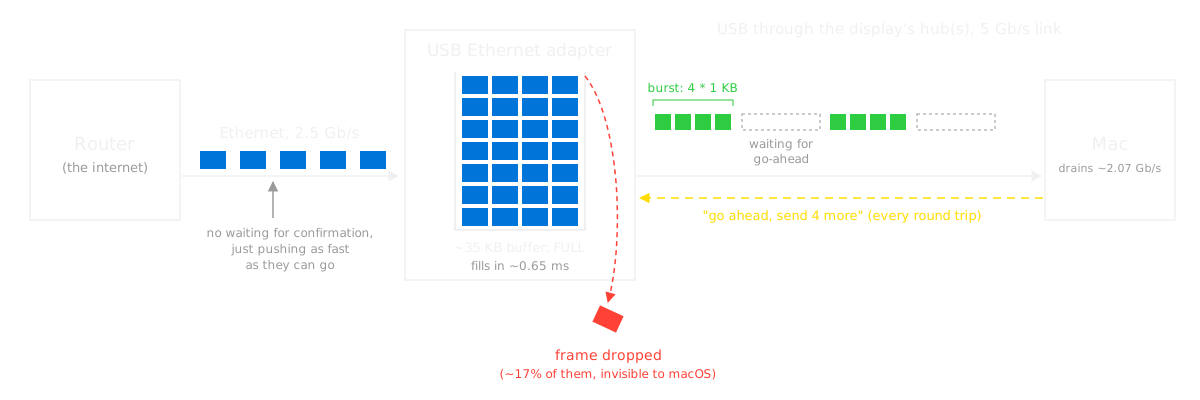
"if the speed of the drain from my adapter to my Mac is half a gig slower than the speed of the input, then you can imagine the buffer getting filled more and more until it overflows. Those are dropped packets, which result in a hard backoff when the router resends them, so you drop loads in speed. And that’s the reason for all of this."

With diagram https://blog.tymscar.com/studio-display-ethernet/bottleneck....

The monitor decides to send the adapter's packets on at only 2 Gbit/s, which leads to buffer overflow, thus packet loss, thus e.g. TCP congestion-control backoff.

The only thing we don't know is _why_ the monitor chooses to limit the bandwidth to those 2.07 Gbit/s (computed as the 41 KiB blocks per (7.6+8.2) µs). If it sent e.g. 81 KiB blocks, doubling the bandwidth, the problem wouldn't happen.

That'd be between Apple and the monitor.

▲archerx 4 hours ago | parent | prev [-]

I’m guessing it’s a USB bandwidth issue. I learned about these kind of limitations when I tried to have 3 kinects running at the same time on the same USB bus.

▲swiftcoder 3 hours ago | parent | next [-]

> I’m guessing it’s a USB bandwidth issue

It's explicitly not a bandwidth issue (that would also affect the SSD). It's a latency issue - the chip doesn't have a big enough buffer to keep sufficient packets in flight at once.

▲nh2 an hour ago | parent [-]

> It's explicitly not a bandwidth issue

That's explicitly the opposite of what the author says.

"the speed of packets coming into the adapter is 2.5 Gbps. That’s what the router pushes in. The speed going out is around 2 Gbps."

Of course latency is always on the denominator side in the "bandwidth = data / time" equation, but it seems wrong to claim it's latency when it could also be improved by fixing the numerator; it's the entire fraction that's insufficient, thus bandwidth. As written:

"The reason is that if you add up the average time it takes to get the go-ahead through my monitor’s hub, which is around 7.6 µs, to the average time it takes to send 4 KB, around 8.2 µs, you can find what the maximum speed is"

And later, increasing the numerator is exactly what fixes it with the other hardware: "I can see that instead of sending 4 1 KB packets per burst, it would send 8!"

> the chip doesn't have a big enough buffer to keep sufficient packets in flight at once

How does this make sense? Even if his buffer was 100x larger, if the fill bandwidth exceeds the drain bandwidth, it'll eventually fill up. The article says that explicitly:

"Well, if the speed of the drain from my adapter to my Mac is half a gig slower than the speed of the input, then you can imagine the buffer getting filled more and more until it overflows."

▲swiftcoder 34 minutes ago | parent | next [-]

> Even if his buffer was 100x larger

"buffer" was perhaps a poor choice of words on my part, because "buffer" is ambiguous. In this case I am referring to the "transmit buffer", which is 4 in the non-working case and raised to 8 in the working adapter.

> Even if his buffer was 100x larger

"buffer" was perhaps a poor choice of words on my part, because "buffer" is ambiguous. In this case I am referring to the notional "transmit buffer", which is 4 in the non-working case and raised to 8 in the working adapter.

> "I can see that instead of sending 4 1 KB packets per burst, it would send 8!"

Increasing the number of packets in flight does not change the bandwidth, it only improves latency sensitivity (i.e. you can fire more data before requiring an ACK).

> it seems wrong to claim it's latency when it could also be improved by fixing the numerator.

Increasing the bandwidth without increasing the transmit buffer would not fix this issue. The adapter he ends up buying does both (allow 2x the packets in flight, and 2x the bandwidth).

The bottom line here is that the original adapter handles full duplex 2.5g when plugged into the laptop directly, and the SSD gets full duplex bandwidth in excess of 2.5g through the same intermediate link (i.e. the display), so both the adapter and the display have sufficient bandwidth. The added hop of latency however makes the short transmit buffer insufficient to cover the latency.

▲chrisweekly an hour ago | parent | prev [-]

This primer on latency and bandwidth is 13 years old but still worth sharing (for the sake of all readers)

https://hpbn.co/primer-on-latency-and-bandwidth/

▲KeplerBoy 3 hours ago | parent | prev | next [-]

He states that high speed SSDs through the monitor are fine though.

▲prepend 3 hours ago | parent | prev [-]

Uploads were fine.