| ▲ | NikxDa 3 hours ago |
| This is super cool, and I wish something like this existed at my place, as it enables information sharing without the need for phones/actual screens that shine in your face when the lights are low or tempt you to doomscroll. That said, the large primary display this uses is $2000. That's very hard to justify for any "normal" household, and that's without any mounts, backend, services etc. |
|
| ▲ | rolfus an hour ago | parent | next [-] |
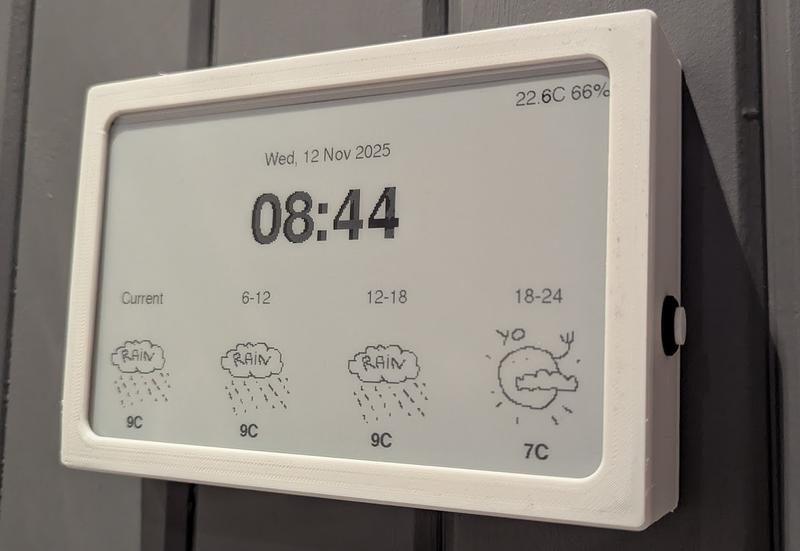
| I made this thing [1] for us, it uses a cheap 10" e-paper display off aliexpress, an ESP32 and a couple of I2C sensors. The case is 3D-printed. It runs on two 18650 batteries, and all in all it cost less than 100$. The OpenWeather API is free for personal use. [1] https://mjones-foui.no/img/wall_clock_1.png |
| |
| ▲ | deepriverfish 33 minutes ago | parent [-] | | hi I've been interested in doing something like this for myself, what tools and software did you use? | | |
| ▲ | golem14 21 minutes ago | parent [-] | | +1, and have you tried running 2 displays side by side ? That should give you an effective diagonal of 14 inches or so, and for those displays, cutting it in two does not really affect the utility of the display (likely tabular content anyway). Seems like the author has experimented with 2 kindles side by side. |
|
|
|
| ▲ | lakid 3 hours ago | parent | prev | next [-] |
| You can make smaller ones for much much less. I’ll post pics of mine a bit later but waveshare 7.5” display in a photo frame and almost any ESP32 dev board and you are set for less than $100 (along with suitable HomeAssistant and ESPhome infrastructure to support it).
The original article is a very slick bit of work, so well done |
| |
| ▲ | fenykep 3 hours ago | parent | next [-] | | The article also mentions using jailbroken kindles which I assume should be the cheapest way to get a decent sized epaper screen with builtin connectivity. edit:
https://github.com/sibbl/hass-lovelace-kindle-screensaver | | | |
| ▲ | Jyaif an hour ago | parent | prev [-] | | You can also buy some for less than $100. I can vouch for the reTerminal: the build quality is excellent, and they come with a battery, sd card reader, and some sensors:
https://www.seeedstudio.com/reTerminal-E1001-p-6534.html | | |
| ▲ | boneitis 26 minutes ago | parent [-] | | Gonna piggyback here to second this and chime in to say I went with the BYOD screen linked within your link for $49 (SKU 104991005). It's definitely more barebones and probably not even as cost-effective if you're still planning on buying the "lifetime" TRMNL API access. I don't have easy access to a 3d printer, so I just have mine sitting on an extra phone stand I had lying around that can be had for a few bucks from Amazon. I couldn't be happier with it and am thoroughly enjoying my complacent, lazy solution :) |
|
|
|
| ▲ | ThrowawayR2 an hour ago | parent | prev | next [-] |
| There are a couple of options for a large, non-backlit, low power display that are less expensive than the e-ink monitor they're using. One is the Samsung EM32DX, a 32" color e-ink digital sign for <$1300 (<$1000 if you can find it on sale) but it has a long refresh time. The other is the SVD rE 32" reflective LCD monitor for ~$1000, but it needs to be in brightly lit rooms because of its low contrast. |
|
| ▲ | ryanckulp 2 hours ago | parent | prev | next [-] |
| OP's Timeframe looks rad, but yes on the pricy side. check out trmnl .com for smaller / less expensive options and self hosted options. (disclaimer: i'm on the team) |
| |
| ▲ | hawksley an hour ago | parent | next [-] | | I’m a big fan of TRMNL! The big difference with the Boox device is real-time updates, which make the smart home status information much more useful. | | | |
| ▲ | woadwarrior01 an hour ago | parent | prev | next [-] | | lol, €17.95 for a Developer "Unlock"[1]. [1]: https://shop.trmnl.com/products/developer-edition | | |
| ▲ | SchemaLoad an hour ago | parent [-] | | That's just a perpetual license to use their hosted server. You are free to use your own self hosted server for free. |
| |
| ▲ | weakfish an hour ago | parent | prev [-] | | Yo Ryan! I get your emails! I was just reading this thinking “man he should’ve tried TRMNL” I love my original one and am planning to get a model X when budget permits |
|
|
| ▲ | tootie 2 hours ago | parent | prev [-] |
| I have a similar setup at home with a homemade dashboard. It's less polished and I've never implemented smart home (don't use any smart home devices) but it's calendar, weather, air quality and subway alerts. I also took the tack of building the UI with Bootstrap 3 so that it will run on any of my ancient devices like a gen 2 ipad air. I did it as much to usefully recycle old screens as anything else. |
| |
| ▲ | bluGill 13 minutes ago | parent [-] | | Home assistant is great even if you don't have devices. It can get data from all you calendars weather and such. |
|